Website structure refers to how pages, categories, and content are organized and connected within a website.It determines how users navigate the site and how search engines crawl, interpret, and index pages.
A clear website structure helps visitors locate information quickly while allowing search engines to understand topic relationships across the website.
Understanding Website Structure
A website is more than a collection of individual pages. It is an interconnected system where each page supports the overall organization of information.
Website structure defines:
- how pages connect to one another
- how information flows through the website
- how visitors move between sections
- how search engines interpret content relationships
When structure is well organized, both users and search engines can easily understand the hierarchy of information.
What Is Website Structure in SEO?
In SEO, website structure describes the arrangement of content and links that allow search engines to discover and interpret pages efficiently.
Search engines rely heavily on internal links and page hierarchy to determine:
- which pages are most important
- how topics relate to one another
- how authority flows across the site
A logical structure improves crawl efficiency and increases the chances that important pages will be indexed.
Key Components of Website Structure
Two elements play a major role in defining website structure.
Internal Linking
Internal links connect pages within the same website.
These links help:
- guide visitors to related content
- distribute page authority across the site
- assist search engine crawlers in discovering new pages
Strategic internal linking strengthens topic relevance and improves navigation.
URL Organization
URLs represent the location of pages within a website hierarchy.
A structured URL provides clear context about where a page belongs.
Example:
example.com/learning/grammar/verb-tenses
This URL indicates that the page belongs to the grammar section under the learning category.
Clear URLs improve both user understanding and search engine interpretation.
Why Website Structure Matters
Website structure influences how easily users and search engines interact with a website.
Better Search Engine Crawling
Search engine crawlers move through websites by following links.
When pages are connected logically, crawlers can discover and index content more efficiently.
Clear Topic Hierarchy
A structured website indicates which pages represent primary topics and which pages provide supporting information.
This hierarchy helps search engines interpret the relevance of each page.
Improved Navigation
Visitors expect to move through websites easily.
Logical structure allows users to find information quickly without confusion.
Lower Bounce Rates
When users locate relevant information faster, they tend to stay longer and explore additional pages.
This improves engagement and reduces bounce rates.
Stronger Topical Authority
Grouping related pages under common categories demonstrates subject expertise.
This strengthens a website’s authority in search results.
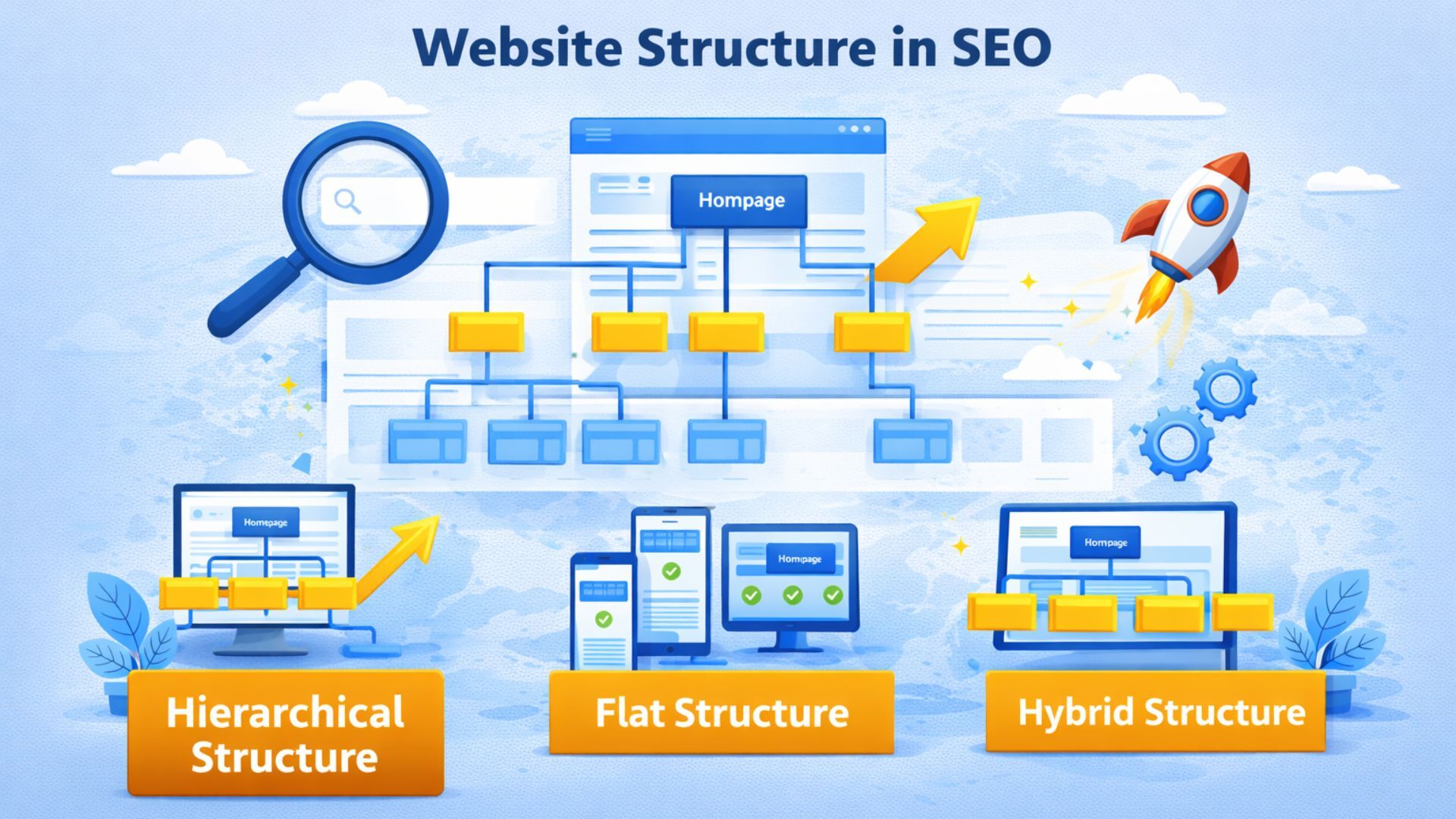
Types of Website Structure
Websites can organize content in several ways depending on their size and purpose.
The three most common structures are hierarchical, flat, and hybrid.
Hierarchical Website Structure
The hierarchical structure organizes pages in a top-down format.
How It Works
The homepage sits at the top of the hierarchy.
From there, pages branch into categories, subcategories, and individual pages.
Example structure:
Homepage
→ Category
→ Subcategory
→ Individual Page
This layered structure keeps related topics grouped together.
Advantages
- clear organization of content
- logical grouping of topics
- easier navigation for visitors
- better understanding for search engines
Best Use Cases
Hierarchical structures are commonly used for:
- blogs
- educational websites
- large content platforms
- informational portals
Flat Website Structure
A flat structure minimizes the number of clicks required to reach pages.
Most pages are accessible directly from the homepage.
How It Works
Instead of deep categories, the homepage links directly to many pages.
Visitors can reach most content within one or two clicks.
Benefits
- faster page access
- easier crawling for search engines
- simplified navigation
Limitations
Flat structures can become disorganized when websites grow large and contain many pages.
Best Use Cases
Flat structures work well for:
- small business websites
- portfolio websites
- simple informational sites
Hybrid Website Structure
Most modern websites use a hybrid structure, combining hierarchical organization with flat accessibility.
How Hybrid Structure Works
The homepage links to primary categories while also linking directly to important pages.
Within categories, pages connect through internal links.
Advantages
- maintains organized categories
- improves accessibility to important pages
- supports large content libraries
- strengthens internal linking networks
Hybrid structures provide flexibility and scalability for growing websites.
Designing a Strong Website Structure
Building an effective structure requires careful planning.
Step 1: Identify Core Topics
Every website focuses on key subject areas.
These topics become the main categories of the site.
Example categories for an educational platform:
- fundamentals
- tutorials
- practice resources
- advanced concepts
These categories create the foundation of the website.
Step 2: Group Related Content
Articles and pages should be organized around related topics.
Grouping content into clusters strengthens topical relevance.
Step 3: Create Structured URLs
URLs should reflect the logical structure of the site.
Example:
example.com/tutorials/basic-concepts
Short and descriptive URLs improve readability and indexing.
Step 4: Build Strategic Internal Links
Internal links connect pages and guide visitors toward deeper information.
For example, a concept page may link to:
- detailed tutorials
- practical examples
- supporting guides
This network strengthens content relationships.
Step 5: Maintain Clear Navigation
Navigation menus should highlight main categories and allow users to move easily between sections.
Simple navigation improves both usability and crawlability.
Pillar Pages and Topic Clusters
Modern SEO strategies often organize content using pillar pages and topic clusters.
Pillar Pages
A pillar page covers a broad topic in detail.
It acts as a central hub that links to supporting articles.
Cluster Pages
Cluster pages focus on specific subtopics connected to the pillar page.
Each cluster page links back to the pillar page and to related content.
Example
Pillar Page: Website Optimization Guide
Cluster Pages:
- internal linking strategies
- page speed optimization
- mobile SEO
- navigation design
This structure signals strong topic authority.
Technical Elements Supporting Website Structure
Beyond content organization, several technical factors support structural efficiency.
XML Sitemap
An XML sitemap lists all important pages on a website.
It helps search engines locate and crawl pages efficiently.
Page Speed
Fast loading pages improve user engagement and reduce abandonment.
Optimizing images, scripts, and hosting helps maintain performance.
Mobile Optimization
With mobile-first indexing, websites must function effectively on mobile devices.
Responsive design ensures structural clarity across screen sizes.
Canonical Tags
Canonical tags help prevent duplicate content by indicating the preferred version of a page.
This ensures search engines index the correct URL.
Common Website Structure Mistakes
Even well-designed sites can develop structural problems.
Orphan Pages
Pages without internal links may remain undiscovered by search engines.
Regular audits help identify these pages.
Excessive Links
Too many links on a page can confuse users and dilute link value.
Links should be placed strategically.
Deep Page Levels
Pages buried several layers deep may receive less attention from both users and search engines.
Important pages should remain within a few clicks of the homepage.
Poor URL Organization
Long or confusing URLs reduce clarity.
Clean and descriptive URLs improve usability.
Structuring Content Around User Intent
Website structure should reflect how visitors search for information.
Users typically search to:
- understand a concept
- solve a problem
- compare solutions
- find detailed guidance
Organizing content around these needs improves relevance and engagement.
Maintaining Website Structure Over Time
Website structure should evolve as new content is added.
Maintenance tasks include:
- updating internal links
- removing outdated pages
- adjusting categories as topics expand
- monitoring crawl errors
Regular improvements ensure the structure remains effective.
Conclusion
Website structure forms the backbone of a successful website.
It determines how content is organized, how users navigate pages, and how search engines interpret relationships between topics.
A well-structured website improves discoverability, enhances user experience, and strengthens topical authority.
By organizing content into logical categories, implementing internal linking strategies, and maintaining clear navigation paths, websites create a framework that supports long-term growth and visibility.