In the ever-evolving world of digital marketing, maintaining a seamless user experience while preserving search engine authority is a delicate balancing act. One of the most critical tools in a webmaster’s arsenal is the URL redirect.
Whether you are migrating to a new domain, merging content, or simply fixing a broken link, understanding what is redirect in SEO can mean the difference between a ranking surge and a total loss of organic traffic. This 3,000-word deep dive explores the mechanics of redirection, the technical differences between status codes, and the best practices to keep Google happy.
What Is Redirect in SEO?
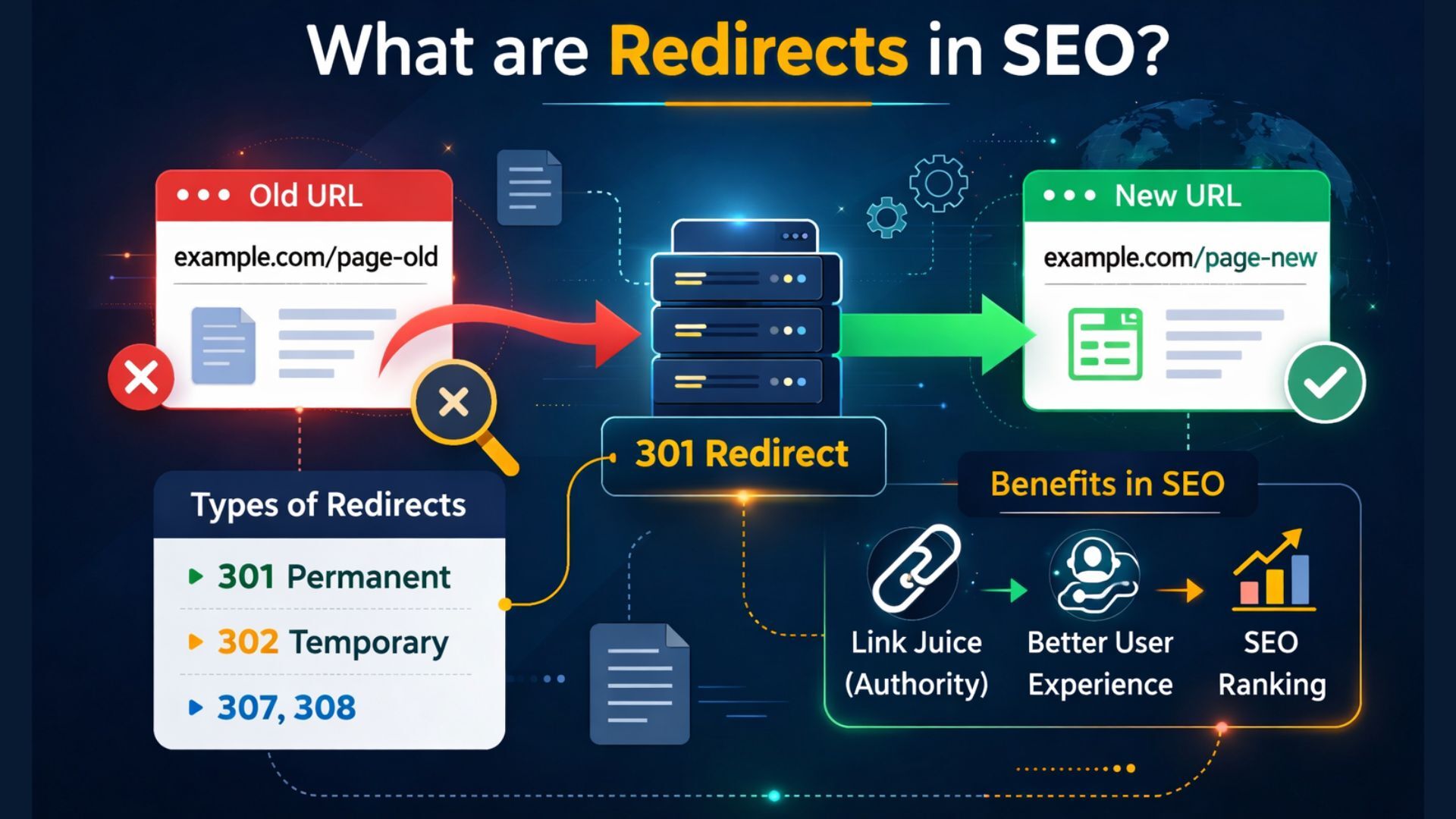
At its core, a redirect is a way to send both users and search engines to a different URL from the one they originally requested. Think of it as the digital equivalent of a “Change of Address” form at the post office.
When a browser (like Chrome or Safari) or a search engine crawler (like Googlebot) attempts to access a page, the server sends back a status code. If that code is a redirect, it instructs the browser to move to a new destination automatically.
Why Redirects Matter for Search Engines
Redirects are essential for:
- Preserving Link Equity: Passing “ranking power” from an old page to a new one.
- User Experience (UX): Preventing the dreaded “404 Not Found” error.
- Crawl Budget Management: Helping Googlebot find your newest content faster without wasting time on dead ends.
Types of Redirects: Server-Side vs. Client-Side
Not all redirects are created equal. They are generally categorized into two groups: Server-Side and Client-Side.
Which Type of Server Redirects to the Websites?
Server-side redirects happen directly on the web server (like Apache, Nginx, or IIS) before the page content even begins to load in the user’s browser. These are the “Gold Standard” for SEO because they provide clear HTTP status codes that search engines understand perfectly.
Client-side redirects, on the other hand, happen inside the browser after the initial page has already started loading. These include Meta Refresh and JavaScript redirects. While they work, they are often slower and less reliable for passing SEO authority.
Deep Dive into Server-Side Redirects: 301, 302, and 307
If you want to know which redirect is best for SEO, you must understand the “3xx” family of status codes.
301 Redirect SEO: The Permanent Move
A 301 redirect is a permanent redirect. It tells search engines: “This page has moved forever. Please transfer all the ranking power and backlinks from the old URL to this new one.”
- SEO Impact: High. It passes roughly 95% to 99% of link equity.
- Use Case: Site migrations, changing from HTTP to HTTPS, or merging two identical articles.
- Google Redirect Treatment: Google will eventually remove the old URL from its index and replace it with the new one.
302 Redirect SEO: The Temporary Shift
A 302 redirect is a temporary redirect. It tells search engines: “The page is currently elsewhere, but it will be back soon. Don’t update your index.”
- SEO Impact: Low. It typically does not pass link equity.
- Use Case: A/B testing, seasonal promotions, or temporary maintenance.
- Google Redirect Treatment: Google keeps the old URL in the index because it expects the move to be reversed.
307 Redirect: The Modern Temporary Redirect
The 307 redirect is the HTTP 1.1 successor to the 302. While 302s are sometimes ambiguous, a 307 ensures that the HTTP method (like GET or POST) remains unchanged during the redirect.
- What is 301 302 and 307 redirects difference? While 301 is permanent, 302 and 307 are temporary. 307 is technically more precise for modern servers, but for general SEO purposes, Google often treats 302 and 307 similarly.
308 Redirect: The Modern Permanent Redirect
Just as 307 is the modern 302, the 308 redirect is the modern version of the 301. It is permanent and preserves the request method.
Comparing Redirects: Which is Best for Your Strategy?
Choosing the wrong code can devastate your rankings. Use this table as a quick reference:
| Redirect Code | Type | SEO Value | Best For… |
| 301 | Permanent | Excellent | Moving domains, fixing 404s. |
| 302 | Temporary | Neutral | Seasonal sales, A/B testing. |
| 307 | Temporary | Neutral | Form submissions, HSTS. |
| Meta Refresh | Client-Side | Low/Risky | Automatic page refreshes. |
| JavaScript | Client-Side | Moderate | When you can’t access the server. |
How to Implement 301 and 302 Redirects
Depending on your hosting environment, implementation varies.
Using .htaccess (Apache Servers)
For a 301 redirect SEO implementation on Apache, you would add this to your .htaccess file:
Redirect 301 /old-page/ https://www.yourdomain.com/new-page/
Using Nginx
On an Nginx server, the syntax looks like this:
rewrite ^/old-page/(.*)$ https://www.yourdomain.com/new-page/ permanent;
Using WordPress Plugins
If you aren’t comfortable with code, plugins like “Redirection” or “RankMath” allow you to manage types of redirects via a simple dashboard.
Common Mistakes: The “SEO Killers”
Even experts make mistakes. Avoid these pitfalls to keep your Google redirect status healthy:
1. Redirect Chains
A redirect chain occurs when URL A redirects to B, which redirects to C.
- The Problem: Every “hop” slows down the page load and risks losing link equity. Googlebot may stop following the chain after 3-5 hops.
- The Fix: Always redirect directly from A to C.
2. Redirect Loops
This happens when URL A points to B, and URL B points back to A.
- The Problem: The browser gets stuck and eventually displays a “Too Many Redirects” error.
3. Redirecting to Irrelevant Pages
If you redirect a page about “Blue Suede Shoes” to your “Homepage,” Google may treat it as a Soft 404.
- Best Practice: Always redirect to the most relevant equivalent page.
The 301 Redirect and Domain Migrations
When moving an entire website, the 301 redirect is your most important tool. Without it, you lose years of accumulated “Trust” from search engines.
Step-by-Step Migration Redirect Strategy:
- Map your URLs: Create a spreadsheet of every old URL and its new destination.
- Test in Staging: Ensure the redirects work before going live.
- Submit to Google Search Console: Use the “Change of Address” tool.
- Monitor 404s: Check for any “leaks” in your redirect strategy.
Client-Side Redirects: Use with Caution
Meta Refresh
You’ve seen these: “You will be redirected in 5 seconds…”
These are generally bad for SEO. They are slow, frustrate users, and are often associated with spammy “doorway” pages.
JavaScript Redirects
If you cannot access your server’s .htaccess or config files, JavaScript is a fallback.
window.location.replace(“https://www.newurl.com”);
While Google is better at crawling JavaScript now, it’s still safer to use a server-side redirect.
Redirects and Mobile SEO
With mobile-first indexing, ensure your redirects don’t lead mobile users to a “Desktop Only” version of a page. If a mobile user clicks a link to a specific article, they should be redirected to the mobile-optimized version of that same article, not just the mobile home page.
Conclusion: The Power of the Correct Redirect
Mastering types of redirects is about more than just avoiding 404 errors; it’s about controlling the flow of authority through your website.
By using 301 redirects for permanent moves and 302 redirects for temporary changes, you communicate clearly with search engines. This clarity ensures your “Link Juice” continues to flow, your rankings remain stable, and your users never hit a dead end.